How to Switch IT Support Providers Without Disrupting Your Business

A business can switch IT support providers without major disruption when discovery and access transfer are completed before the existing service ends. The essentials are a complete technical handover, verified administrative control, protected backups and an agreed point at which responsibility changes.
Most failed transitions are caused by missing access, unclear ownership or services being cancelled too early—not by the act of changing provider.
1. Review your current contract
Check the notice period, renewal date, termination terms and any exit charges. Identify whether licences, domains, backups, connectivity or equipment belong to your business or sit under the provider’s account. Do not cancel critical services until ownership and replacement arrangements are confirmed.
2. Appoint an internal project owner
One person should maintain the handover checklist, approve decisions and confirm who is responsible at each stage. This may be a Managing Director, Operations Director, Finance Director or internal IT Manager.
3. Create a complete IT inventory
Record users, devices, servers, network equipment, Microsoft 365, domains and DNS, internet and telecoms services, applications, security tools, backups, suppliers, renewal dates, open incidents and planned projects. The incoming provider should use discovery to identify gaps before cutover.
4. Confirm administrative ownership
Your business should retain control of its critical systems. Verify administrator access to Microsoft 365, domains, firewalls, servers, backups and security platforms. Transfer credentials through a secure method—not ordinary email or a widely shared document.
5. Verify backups and recovery
Confirm what is protected, where backups are stored, how long copies are retained, who controls access and when a recovery was last tested. A successful backup notification does not prove that data can be restored.
6. Use a staged handover
Allow time for discovery, documentation transfer, deployment of monitoring and support tools, testing, staff communication and formal sign-off. During the overlap, employees must know which service desk to contact and how urgent incidents will be escalated.
7. Remove old access after sign-off
Once the new provider confirms that support is operational, change shared credentials, remove obsolete administrator accounts, revoke old remote-access tools and record returned equipment. Ask the former provider to confirm its data-retention or deletion arrangements.
If backup ownership or recoverability is uncertain, review HTL’s backup and disaster-recovery services before the old arrangement is switched off.
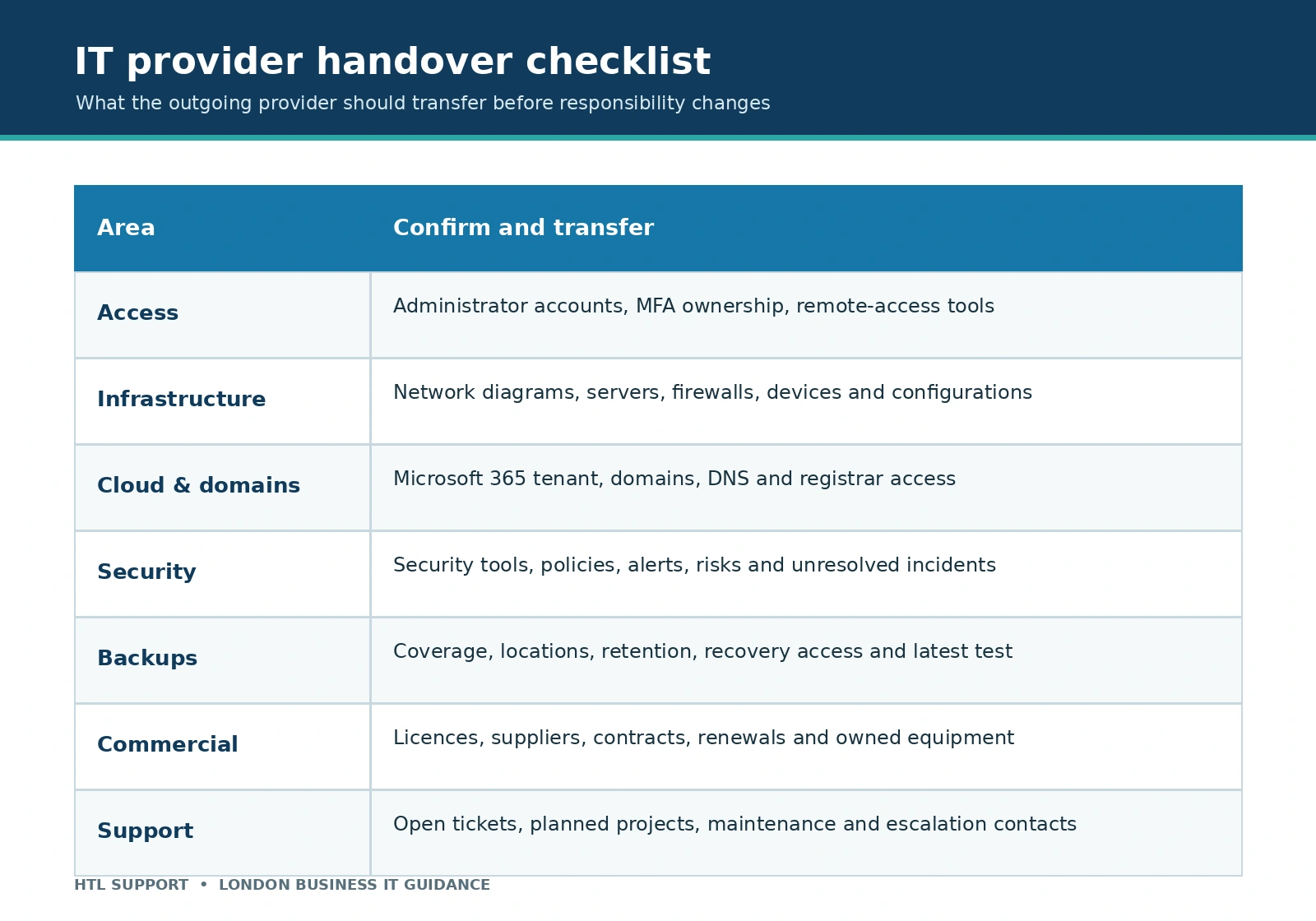
What should the outgoing IT provider hand over?

- Network and infrastructure documentation
- Administrative accounts and secure credential transfer
- Hardware, software and licence inventories
- Supplier contacts and renewal dates
- Backup and recovery documentation
- Security configurations and known risks
- Open-ticket history and unresolved issues
- Planned maintenance and current projects
Incomplete documentation is a warning sign, but it does not always prevent a switch. An experienced incoming provider can reconstruct missing information through technical discovery—provided enough time is allowed before the contract ends.
Planning to change IT support companies?
HTL provides outsourced IT support in London and can assess an existing environment before responsibility is transferred. Arrange a free IT review to discuss a controlled changeover.
Related Posts
By accepting you will be accessing a service provided by a third-party external to https://www.htl.london/